Requirements & data
MT5 desktop, available chart history and the correct bundled model files for the intended timeframe.
PERCEPTIONLEVEL / MT5
A model-based chart companion displaying directional forecasts and confidence information in MT5.
PL Neural Forecast Companion presents directional forecasts and confidence information on an MT5 chart. It supports manual review of model output alongside price data; the display is intended to help you understand the available forecast rather than automatically make a trading decision.
Compatibility and the documented model integration should be reviewed in a demonstration before use. Confidence information is model output, not a guarantee of accuracy or profitability. Model architecture, training details and proprietary decision rules are not part of the public product description.
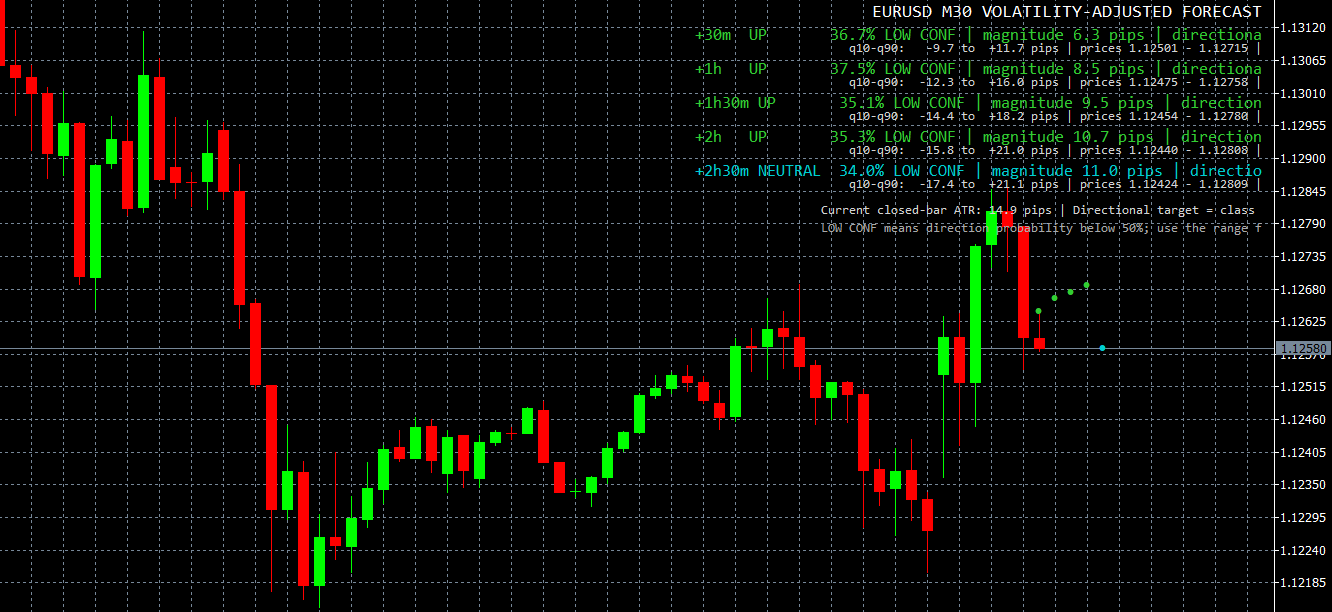
WHAT IT OFFERS
MT5 desktop, available chart history and the correct bundled model files for the intended timeframe.
Educational example, not a tested trading system. Use price confirmation and risk controls; the indicator alone is not an entry signal.
Trade planning and risk — CME Group ↗Attach the indicator to an MT5 chart and review its display. It supports analysis; it does not place orders. Individual software training can be requested.
The development chat documents this existing companion and its EA integration; it does not establish model accuracy or independent performance validation. Forecasts are estimates, not guarantees.
A CLOSER LOOK
Ask for a demonstration, confirm compatibility with your broker and discuss installation, licensing and individual software training.