Requirements & data
MT5 desktop plus an external, appropriately licensed options dataset supplied in the supported CSV format. Symbol names and timestamps must match the intended chart.
PERCEPTIONLEVEL / MT5
Bring external FX implied-volatility observations into your MT5 analysis workspace.
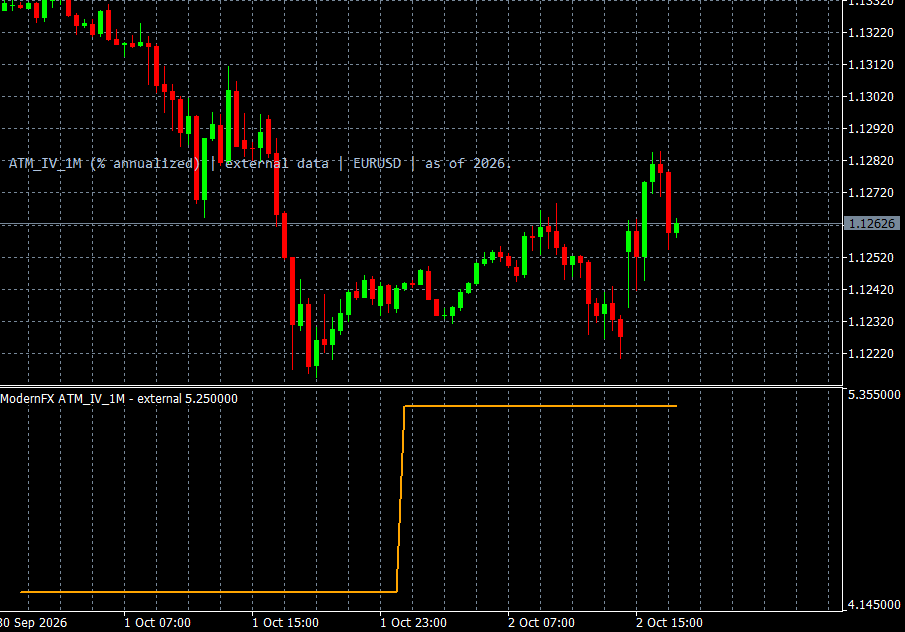
Implied Volatility displays externally supplied volatility observations within MT5. CSV import and symbol or series selection let you bring a chosen dataset into the same workspace used for price-chart analysis. A supplied volatility-index series is also supported when suitable licensed data is available.
The tool includes handling for freshness and missing observations, making data availability part of the interpretation process. It displays the supplied series rather than creating a data subscription or reconstructing a provider’s proprietary index from ordinary candles. A demonstration can cover the supported file format, series selection and the distinction between volatility information and price direction.
WHAT IT OFFERS
MT5 desktop plus an external, appropriately licensed options dataset supplied in the supported CSV format. Symbol names and timestamps must match the intended chart.
Educational example, not a tested trading system. Use price confirmation and risk controls; the indicator alone is not an entry signal.
Trade planning and risk — CME Group ↗Add Implied Volatility to the relevant MT5 desktop chart, confirm that the required data is available, and review the display together with your price chart. Start with a demonstration or a demo environment to understand the available controls and data limitations. Individual training on installation and interpretation can be requested. This indicator supports analysis and does not place orders.
It displays the supplied series and does not create a market-data subscription or calculate a provider’s proprietary index from chart prices. Volatility does not determine price direction.
A CLOSER LOOK
Ask for a demonstration, confirm compatibility with your broker and discuss installation, licensing and individual software training.