Requirements & data
MetaTrader 5 desktop with chart history supplied by your broker. Data availability varies by instrument and provider.
PERCEPTIONLEVEL / MT5
A chart overlay that organises estimated activity by price and displays reference levels for market analysis.
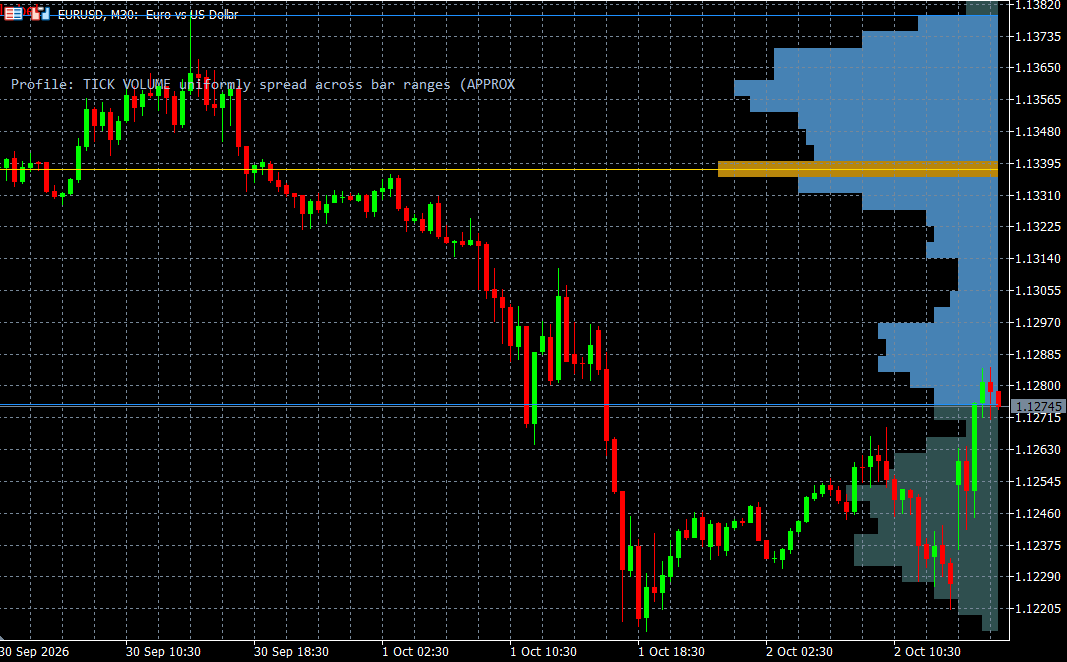
Volume Profile organises estimated market activity by price using a horizontal histogram over a selected analysis window. This layout makes it easier to review how the displayed activity is distributed across the price range, alongside the price chart itself.
The product includes Point of Control and value-area reference levels, together with configurable display and analysis-window options. These references summarise the available data and can change when the window updates. The implementation uses a bar-based approximation, so the profile should not be mistaken for a complete transaction-by-transaction market record.
WHAT IT OFFERS
MetaTrader 5 desktop with chart history supplied by your broker. Data availability varies by instrument and provider.
Educational example, not a tested trading system. Use price confirmation and risk controls; the indicator alone is not an entry signal.
Trade planning and risk — CME Group ↗Add Volume Profile to the relevant MT5 desktop chart, confirm that the required data is available, and review the display together with your price chart. Start with a demonstration or a demo environment to understand the available controls and data limitations. Individual training on installation and interpretation can be requested. This indicator supports analysis and does not place orders.
This implementation uses a bar-based approximation. It is not a record of every transaction at each price. Reference levels can change as the analysis window updates.
A CLOSER LOOK
Ask for a demonstration, confirm compatibility with your broker and discuss installation, licensing and individual software training.