Requirements & data
MetaTrader 5 desktop with chart history supplied by your broker. Data availability varies by instrument and provider.
PERCEPTIONLEVEL / MT5
A visual companion for reviewing market structure and identified areas of interest on MT5 charts.
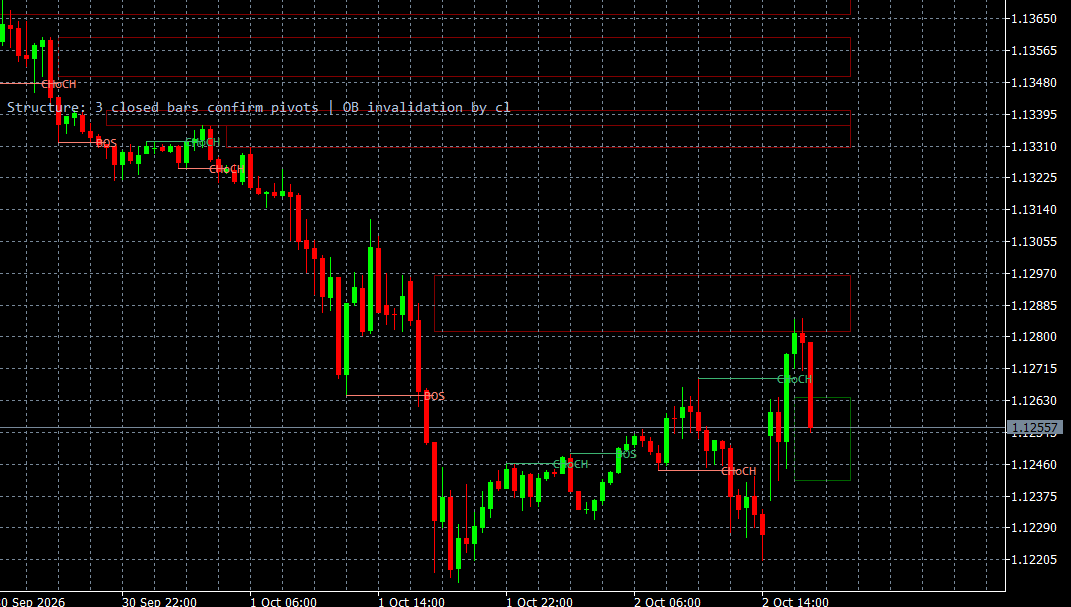
Market Structure brings structure annotations and identified areas of interest into your MT5 chart review. It provides a visual companion for organising the available price information and examining how the displayed structure relates to the surrounding chart.
The labels and zones are interpretations of price data rather than a direct view of institutional orders. The tool supports a manual workflow and does not automatically execute trades or guarantee market direction. A demonstration can clarify the displayed annotations and the available presentation options, while keeping the implementation rules confidential.
WHAT IT OFFERS
MetaTrader 5 desktop with chart history supplied by your broker. Data availability varies by instrument and provider.
Educational example, not a tested trading system. Use price confirmation and risk controls; the indicator alone is not an entry signal.
Trade planning and risk — CME Group ↗Add Market Structure to the relevant MT5 desktop chart, confirm that the required data is available, and review the display together with your price chart. Start with a demonstration or a demo environment to understand the available controls and data limitations. Individual training on installation and interpretation can be requested. This indicator supports analysis and does not place orders.
Structure labels and zones are analytical interpretations of available price data. They do not expose actual institutional orders or guarantee market direction.
A CLOSER LOOK
Ask for a demonstration, confirm compatibility with your broker and discuss installation, licensing and individual software training.