Requirements & data
MetaTrader 5 desktop with chart history supplied by your broker. Data availability varies by instrument and provider.
PERCEPTIONLEVEL / MT5
A cumulative activity display for reviewing changes in market participation alongside price.
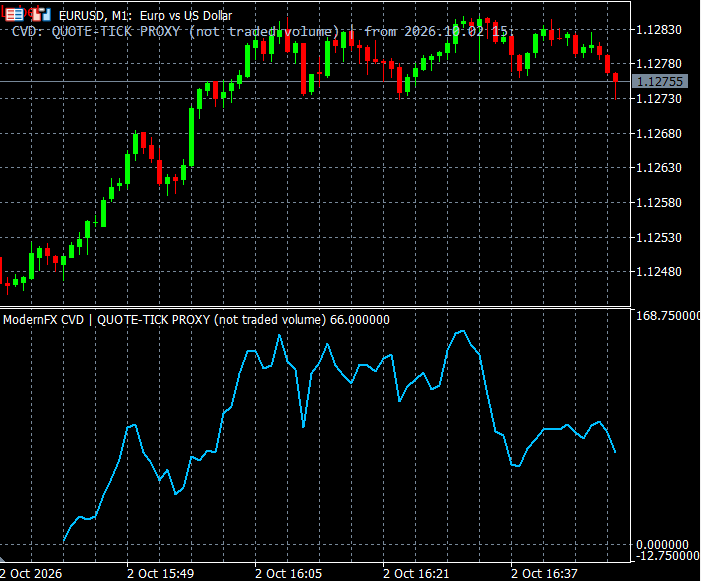
Follow cumulative market activity alongside the price chart. Cumulative Delta gives you an additional way to review how participation develops over the period shown, rather than looking only at individual price candles. Its cumulative display supports manual comparison between price movement and the activity information supplied by the selected data mode.
The indicator distinguishes quote-based estimates from transaction-data observations where an appropriate feed is available. This distinction matters when interpreting the display: an estimate derived from quotes should be treated as an analytical proxy. During a demonstration, we can review the data mode available for your broker and explain how to interpret the output.
WHAT IT OFFERS
MetaTrader 5 desktop with chart history supplied by your broker. Data availability varies by instrument and provider.
Educational example, not a tested trading system. Use price confirmation and risk controls; the indicator alone is not an entry signal.
Trade planning and risk — CME Group ↗Add Cumulative Delta to the relevant MT5 desktop chart, confirm that the required data is available, and review the display together with your price chart. Start with a demonstration or a demo environment to understand the available controls and data limitations. Individual training on installation and interpretation can be requested. This indicator supports analysis and does not place orders.
The quote-based display is a proxy, not actual buying or selling volume. Transaction mode requires suitable classified trade data. Available history depends on the broker feed.
A CLOSER LOOK
Ask for a demonstration, confirm compatibility with your broker and discuss installation, licensing and individual software training.