Requirements & data
MetaTrader 5 desktop with chart history supplied by your broker. Data availability varies by instrument and provider.
PERCEPTIONLEVEL / MT5
A price-reference indicator for viewing market activity from a selected starting point.
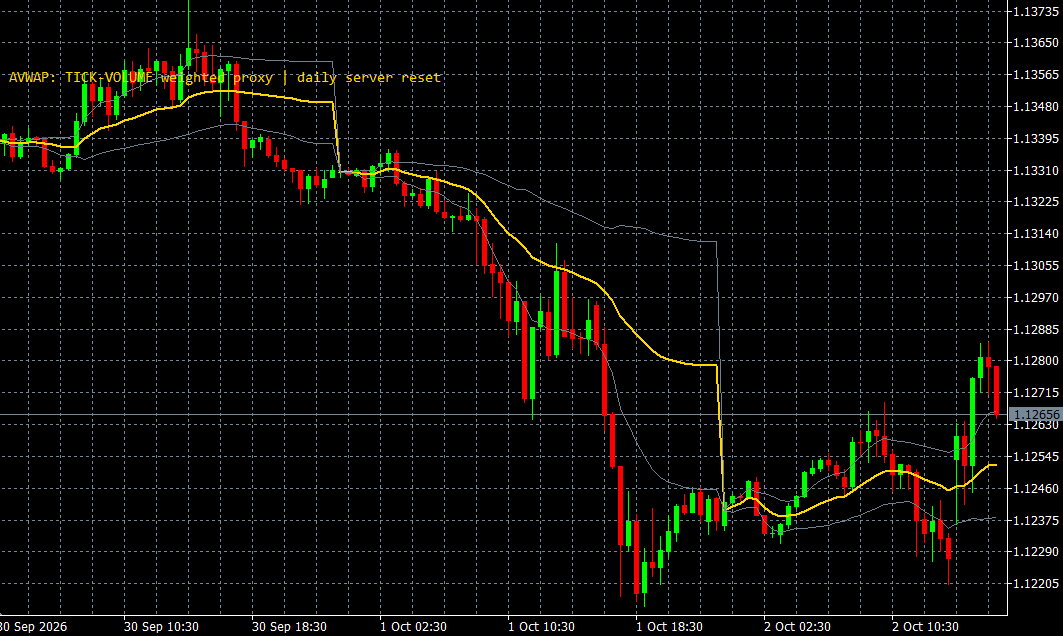
Anchored VWAP provides a visual price reference beginning at a selected starting point. It lets you review subsequent price behaviour in relation to that anchored reference within an MT5 chart, adding context to your existing chart analysis.
The selected anchor and the volume information available from the broker affect how the reference should be interpreted. Different starting points can produce different analytical perspectives. We can demonstrate the available controls and explain the distinction between broker tick volume and actual traded volume, without prescribing a trading decision.
WHAT IT OFFERS
MetaTrader 5 desktop with chart history supplied by your broker. Data availability varies by instrument and provider.
Educational example, not a tested trading system. Use price confirmation and risk controls; the indicator alone is not an entry signal.
Trade planning and risk — CME Group ↗Add Anchored VWAP to the relevant MT5 desktop chart, confirm that the required data is available, and review the display together with your price chart. Start with a demonstration or a demo environment to understand the available controls and data limitations. Individual training on installation and interpretation can be requested. This indicator supports analysis and does not place orders.
Its interpretation depends on the selected starting point and available volume data. Broker tick volume should not be presented as complete traded forex volume.
A CLOSER LOOK
Ask for a demonstration, confirm compatibility with your broker and discuss installation, licensing and individual software training.